PDFs, slides, Word files and photos · page citations
Turn PDFs and lecture
slides into study notes.
Upload a PDF, a PowerPoint or Word file, or photos of your own notes. NoteAlong writes the study note and keeps an image of each page, so you can check any point against the page it came from.
Updated
Can AI make notes from a PDF?
Yes. NoteAlong turns a PDF, PowerPoint, Word file or photo of your notes into a study note. Each page you use stays with the note as an image, key diagrams are cut out and placed in the text, and a citation like (p. 12) opens that page. Flashcards and quizzes come from the same note. Free notes hold up to 30 pages, with 50 pages a month.
At a glance
What goes in, and what stays in the note?
PDFs, slides, Word files and photos go in, and the note keeps an image of every page you chose, along with its key diagrams, its tables and its math.
| Spec | Details |
|---|---|
| Files you can upload | PDF, PowerPoint (PPTX, PPT), Word (DOCX, DOC), OpenDocument (ODP, ODT), RTF, and photos (JPG, PNG, WebP, HEIC). Up to 20 files in one note. |
| File size | PDFs and slide decks up to 100 MB each, Word files up to 50 MB, photos up to 25 MB, and 300 MB per upload. |
| What stays in the note | An image of every page you chose, opened by citations like (p. 12). Key diagrams cut out of the page and placed where the note discusses them. Tables stay tables and math stays math. |
| Page limits | Free: up to 30 pages per note and 50 pages a month. Pro: up to 300 pages per note and unlimited pages a month. |
| Longer files | Choose the pages before anything is read: a range like 1-30, a chapter from the PDF's outline, or single pages. Pages you leave out don't count. |
| Scans and handwriting | Yes. Scanned pages and photos of handwritten notes are read as images. Words you crossed out are left out. |
| A page it can't read | The note names it (“We couldn't read page 14”) and the Pages tab marks it. Nothing is skipped silently. |
| Your file | Private to you. The original file is deleted once its pages are read. The page images stay with the note, and deleting the note deletes them. We don't train on your content. |
| Price | Free: $0, no card. A document uses 1 of your 5 notes a month. Pro: $12/month or $96/year. |
Limits as of November 2026. Each PDF page, slide or photo counts as one page.
Three steps
How do you turn a PDF into study notes?
Upload the file, choose the pages if it's long, and NoteAlong writes a note that cites the page behind each point.
01
Add the files
Drop in a PDF, a deck, a Word file or photos, on a computer or from your phone's browser. Several files can make one note, in the order you set.02
Choose the pages
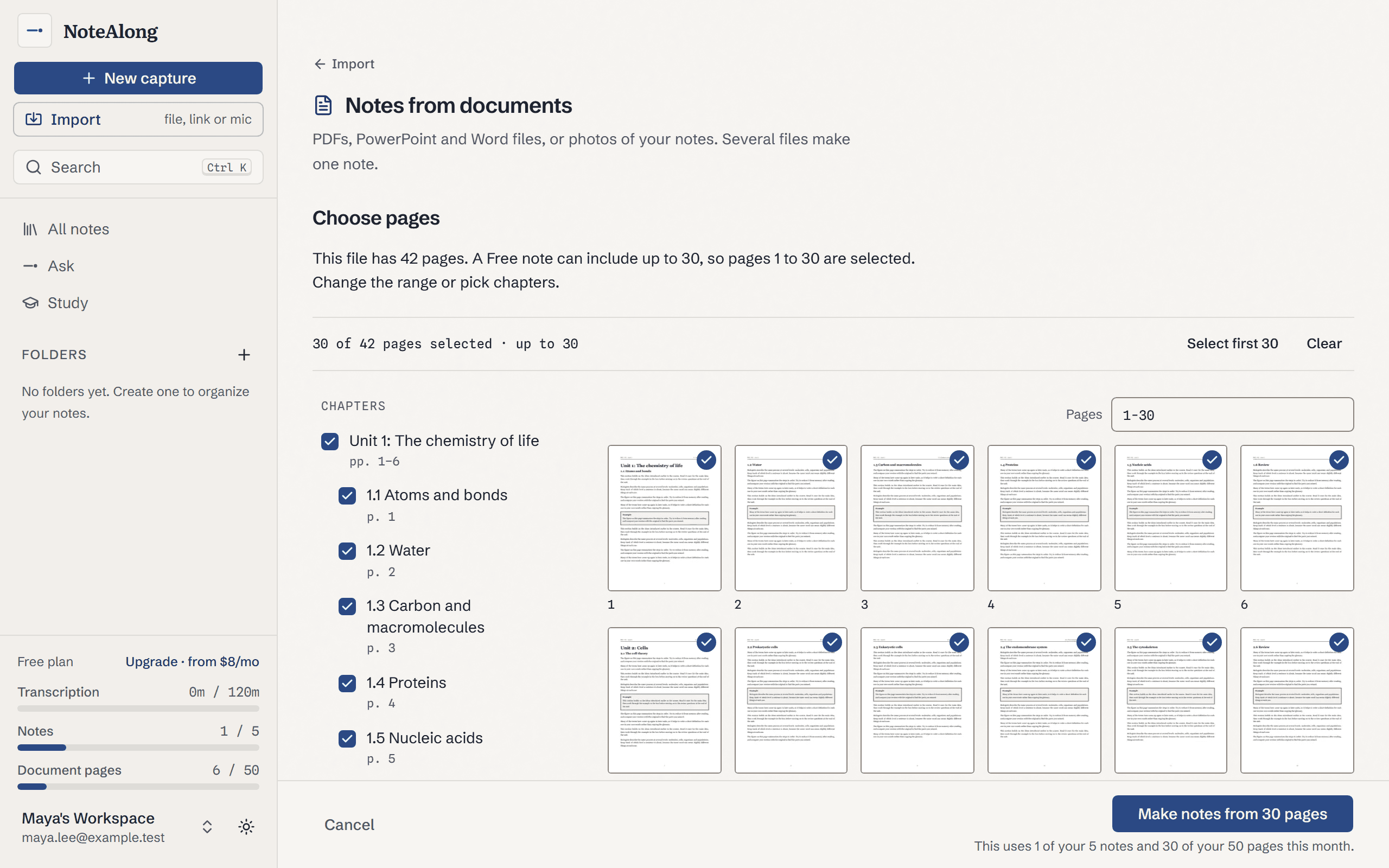
NoteAlong counts the pages first. If the file is over your limit, a page picker opens: type a range, pick a chapter, or tap the pages you want. Nothing is used until you confirm.03
Read the note
It follows the document's own order, with a TL;DR at the top, sections, a key terms table and takeaways. Each point cites its page, and the page itself is one click away.
Lecture slides
How do you turn lecture slides into notes?
Upload the deck as a PDF or PowerPoint file, and NoteAlong writes the note slide by slide, with slide images placed where they're discussed.
Professors often post the deck on Canvas or Blackboard as a PDF or a .pptx. Either works, as does an OpenDocument .odp. If a .pptx has speaker notes, NoteAlong reads those too, and they often hold the explanation the slide leaves out. Citations point at slides, like (slide 4), and the Slides tab shows every slide you chose, in order.
Keynote and Google Slides files can't be uploaded as they are. Export them as a PDF or PowerPoint file first. Hidden slides in a PowerPoint file are skipped.
Textbooks
Can it turn a textbook chapter into notes?
Yes, one chapter at a time: upload the PDF, pick the chapter from its outline or type its page range, and the note cites the pages it used.
On Free a note can include 30 pages, so a long chapter may take two notes; Pro fits 300 pages in one. Citations use the PDF's own page numbers, which can differ from the numbers printed on the page. Check the book's terms first: some publishers, OpenStax among them, don't allow their books in AI tools without permission.
The note helps you review a chapter. It doesn't do the reading for you. If you would rather write your own notes as you go, here's how to take notes from a textbook without copying it out.
Figures, tables, math
Does it keep diagrams, tables and math?
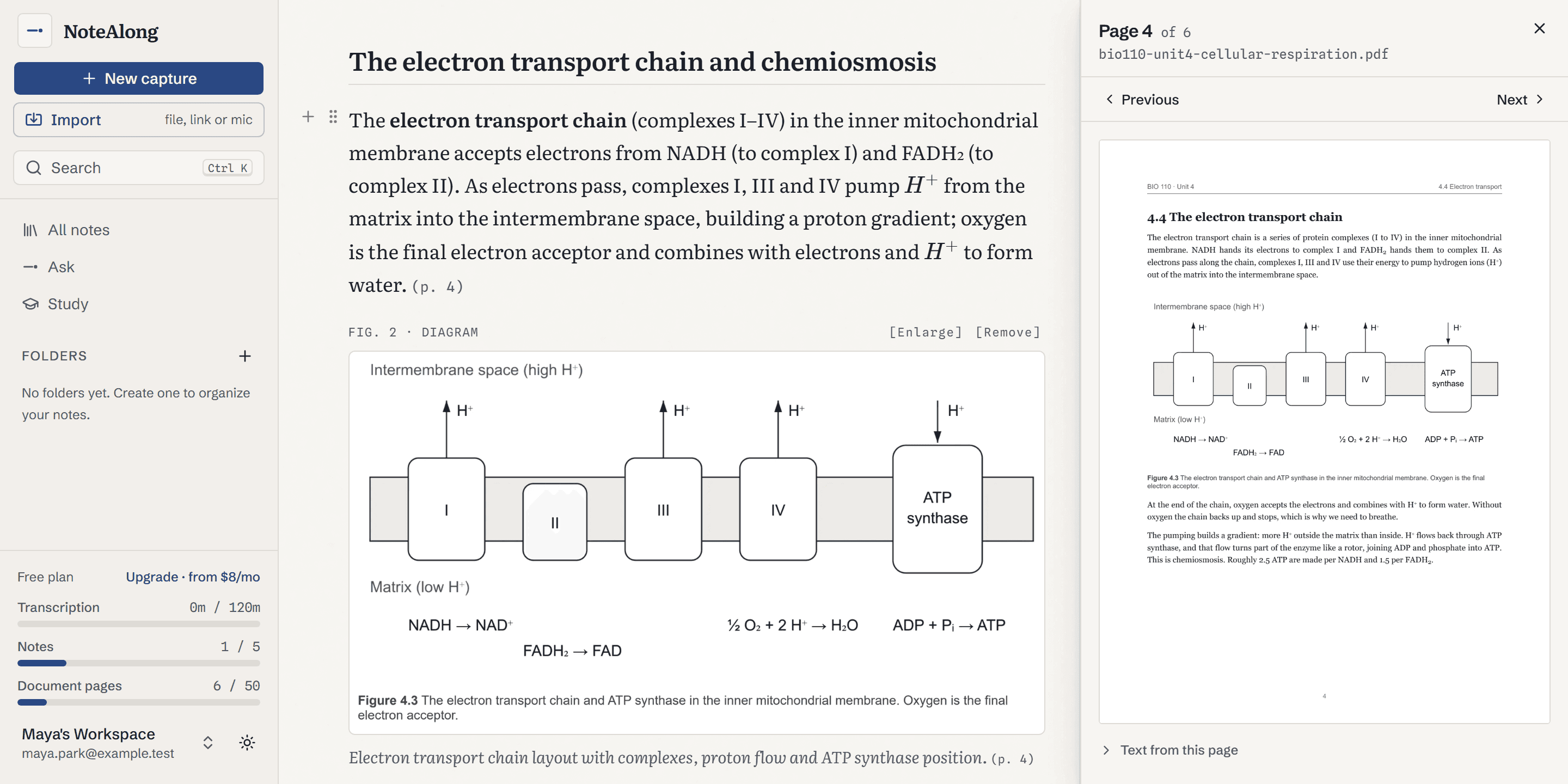
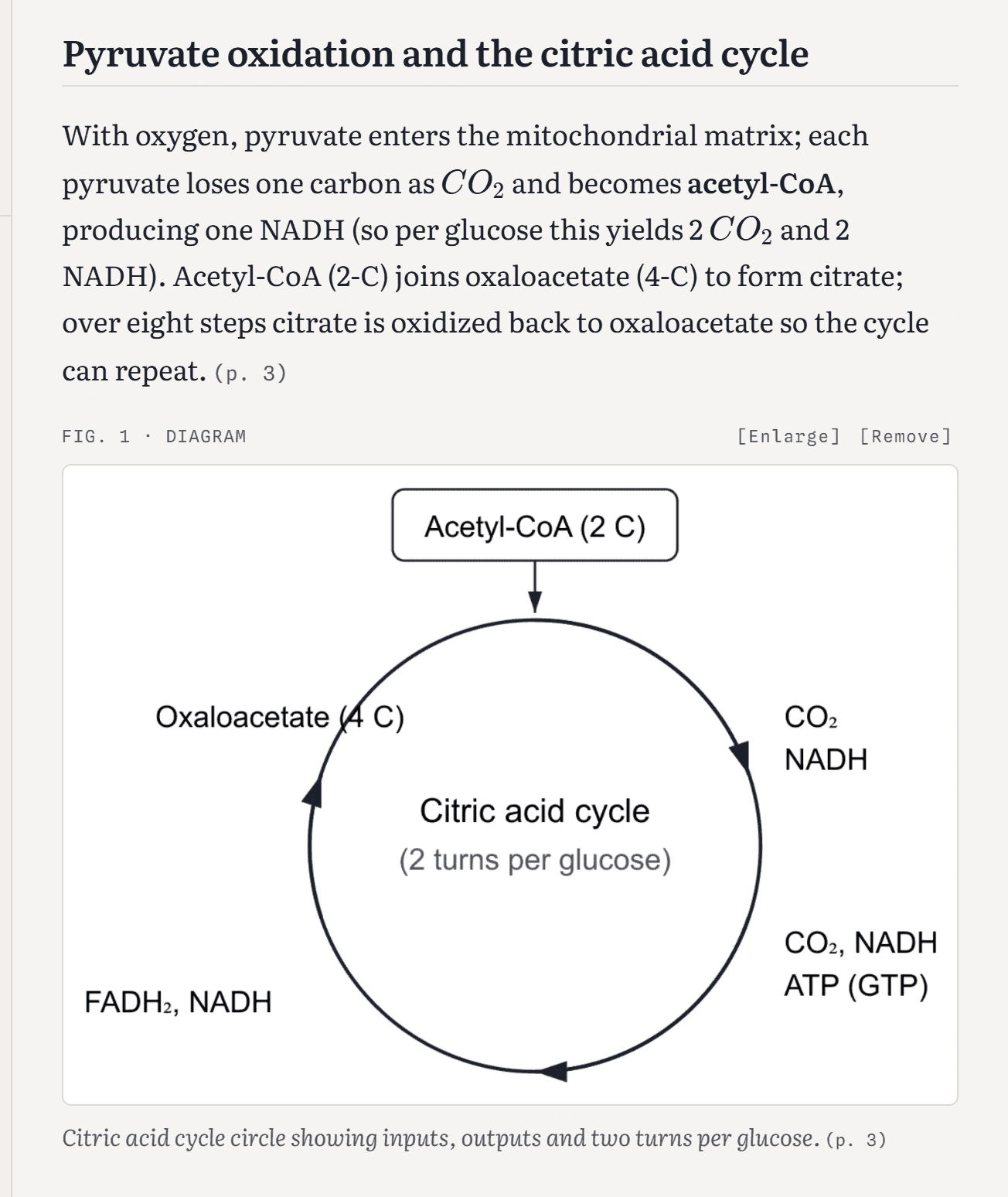
Yes: key diagrams are cut out of the page and placed where the note discusses them, tables stay tables, and math is written as real equations.
Click a figure to enlarge it, then “Full page” to see it on its page. Under each page in the Pages tab, “Text from this page” shows what NoteAlong read there, so you can see what made it into the note.
Handwriting
Can it read handwritten notes?
Yes. Photos of your handwritten notes and scanned pages are read as images and turned into a study note you can make flashcards from.
On a phone, open NoteAlong in the browser and press Take a photo, or choose photos you already took. Several photos make one note. Neat handwriting reads best, and if a page can't be read at all, the note says which one instead of guessing.
Words you crossed out are left out of the note. Each photo stays in the Pages tab next to the text read from it, so you can compare the two.
Study from it
Can you make flashcards and a quiz from a PDF?
A note made from a PDF has the same Study tab as any other note: flashcards, a quiz and spaced review, all written from the note.
The cards come from the note, not from every line of the file, so a 30-page chapter gives you a deck you can get through. Review them in NoteAlong on a schedule, or send them to Ankifor free as an .apkg or CSV. Obsidian and Markdown export are free too; Notion sync and PDF export are included in Pro. It's the same Study tab you'd use for flashcards from a YouTube video.
Add slides
Can you add the slides to a lecture note you already have?
Press Add slides on a note from a shared tab, your mic, an audio or video file or a YouTube link, choose the deck, and NoteAlong rewrites the note slide by slide.
Each slide that came up gets its image and what the lecturer said while it was up. Anything said in class but not on any slide gets its own section at the end, titled “Said in class but not on the slides”. The version without slides is kept, and you can switch back to it.
It uses 1 note, and on Free the deck's slides count toward your 50 pages. If the slides don't match the lecture, the note stays as it was and no note is used. To get the lecture in first, see the AI lecture note taker: share the tab it plays in, or record the lecture in the room with your mic if your course allows it.
Limits
How many pages can you upload for free?
On Free, one note can include up to 30 pages and you get 50 document pages a month; each document also uses 1 of your 5 notes.
A lecture deck or a short chapter fits in one note. A whole textbook doesn't, and the page picker shows that before anything is read. Pro fits up to 300 pages in one note, with unlimited pages a month, for $12/month or $96/year. Compare the plans.
Checked November 3, 2026
How is this different from ChatGPT or NotebookLM for PDFs?
ChatGPT answers questions about a PDF in a chat and NotebookLM researches across many sources at once; NoteAlong makes one study note that keeps each page and cites it.
Start with what they do better. NotebookLM is free, holds up to 50 sources in a notebook, and limits each source by words (500,000) rather than pages, so a stack of papers fits where a 30-page Free note doesn't. ChatGPT reads a photo of a handwritten whiteboard in a chat, and Google's Gemini app turns photos of handwritten notes into study guides and flashcards. For a quick answer about one file, either is fine.
NoteAlong is for the note you study from all semester: the pages kept, the diagrams in place, and cards that come from the note.
| For a PDF or deck | NoteAlong | ChatGPT | NotebookLM |
|---|---|---|---|
| Free to start | Yes: 30 pages a note, 50 a month | Yes; file uploads are limited on the Free plan | Wins: free, with up to 50 sources per notebook |
| How much at once | 30 pages a note on Free, 300 on Pro; up to 20 files in one note | Several files in one chat; size limits are in OpenAI's help center | Wins: up to 500,000 words or 200 MB per source, no page count |
| Images and diagrams inside a PDF | Read, and key diagrams cut out and placed in the note | Depends on your plan; OpenAI's help center says which plans read the images in a PDF | Google says it understands the text, images and graphs in a PDF (April 2025) |
| Going back to the page | Every page you chose is kept as an image; (p. 12) opens it | Answers in the chat | Citations jump to the quote in your source |
| Photos of handwriting | Read as images; crossed-out words left out | Wins for a quick look: reads a photo of a handwritten whiteboard in a chat | Takes photos as sources (JPG, PNG, HEIC and more); Google doesn't say how well it reads handwriting |
| PowerPoint | PPTX, PPT and ODP; speaker notes in a .pptx are read | Accepts PPTX files | PPTX files, and Google Slides up to 100 slides |
| Flashcards and review | Flashcards, quizzes and spaced review; free Anki and Obsidian export | Writes flashcards, or quizzes you, when you ask in the chat | Flashcards and quizzes with progress tracking; flashcards download as CSV |
Checked November 3, 2026 against Google's help pages (sources and limits, plans, citations, flashcards), Google's April 2025 update on PDFs with images and OpenAI Academy. ChatGPT's current limits are in OpenAI's help center (file uploads, images in PDFs). NotebookLM is now called Gemini Notebook. Both products change often, so check their sites for current details.
Use something else
When is NoteAlong the wrong tool for a PDF?
When what you need isn't a study note you'll review, or the file is far bigger than one note.
- A whole 600-page textbook in one note. Free holds 30 pages a note and Pro 300, so work through it chapter by chapter.
- A typed copy of your handwriting. NoteAlong writes study notes, not a transcript of the page. For plain text, use your phone's text recognition, like Live Text on an iPhone or Google Lens.
- Asking questions across 50 research papers at once. NotebookLM is built for that.
- Editing, signing or filling in the PDF itself. A PDF editor such as Adobe Acrobat, or Preview on a Mac, does that.
- An eTextbook that only opens in VitalSource Bookshelf or a publisher's reader. There's no file to upload, and DRM is out of scope.
PDF questions
What students ask before uploading a PDF
Is it free to make notes from a PDF?
Yes. On the Free plan a note can include up to 30 pages, with 50 document pages a month and no card. Each document uses 1 of your 5 free notes a month. Pro fits 300 pages in one note with unlimited pages a month, for $12/month or $96/year.
What file types work?
PDF, PowerPoint (PPTX, PPT), Word (DOCX, DOC), OpenDocument (ODP, ODT), RTF, and photos in JPG, PNG, WebP or HEIC. Up to 20 files can go into one note. Keynote and Pages files need exporting as a PDF first, and files with macros aren't opened.
Does it work on scanned PDFs?
Yes. A scanned page has no text to copy, so NoteAlong reads it as an image, the same way it reads a photo. A faint or blurry scan can come out with gaps, and if a page can't be read at all, the note says which one.
What happens to my file after I upload it?
The original file is deleted as soon as its pages are read, and the pages you didn't choose go with it. An image of each chosen page stays with your note so citations can open it. Delete the note and those images are deleted too.
Is it OK to upload my professor's slides?
Your notes are private to you, and we don't train on your content; our providers run on no-training configurations. Your course's and your school's rules still apply, so check the syllabus: some courses don't allow course materials in AI tools.
Can I choose which pages to use?
Yes. Before anything is read, a page picker shows every page as a thumbnail. Type a range like 1-30, 45, pick a chapter from the PDF's outline, or tap pages one by one. Pages you leave out aren't read and don't count toward your limit.
What if a page can't be read?
The note says so near the top, for example “We couldn't read page 14 (p. 14), so these notes don't cover it.” The Pages tab marks that page too. NoteAlong doesn't guess what an unreadable page said.
Does it work with password-protected PDFs?
Not while the password is on. NoteAlong tells you the file is protected and doesn't open it. If it's your own file, save a copy without the password and upload that. The same goes for a PowerPoint or Word file with a password.
Can I upload from my phone?
Yes. Open NoteAlong in your phone's browser and choose a PDF, or press Take a photo to snap a page of your notes. There's no app to install.
Can I export notes made from a PDF?
Yes. Markdown, Anki (.apkg or CSV) and Obsidian export are free on every plan. Notion sync and PDF export are included in Pro.