mp3, m4a, wav and more · up to 4 hours
Drop in the recording.
Get study notes back.
Upload a lecture recording, course audio or a study podcast. NoteAlong turns it into timestamped study notes you can edit, quiz yourself on and send to Anki.
Updated
How do I turn an audio file into notes?
Open NoteAlong, choose Import, and drop in the file: mp3, m4a, wav, aac, ogg, opus or flac, up to 4 hours long. Your browser converts it to compact audio first, so the original file never leaves your computer. When it's done you get study notes in sections, with timestamps and the full transcript. The free plan covers 120 minutes and 5 notes a month.
How it works
How a recording becomes a note
01
Pick the file
Drag it onto the Import page or choose it. Recordings from your phone work too, as long as they're in one of the formats. Most phones save m4a or mp3.
02
Check the receipt
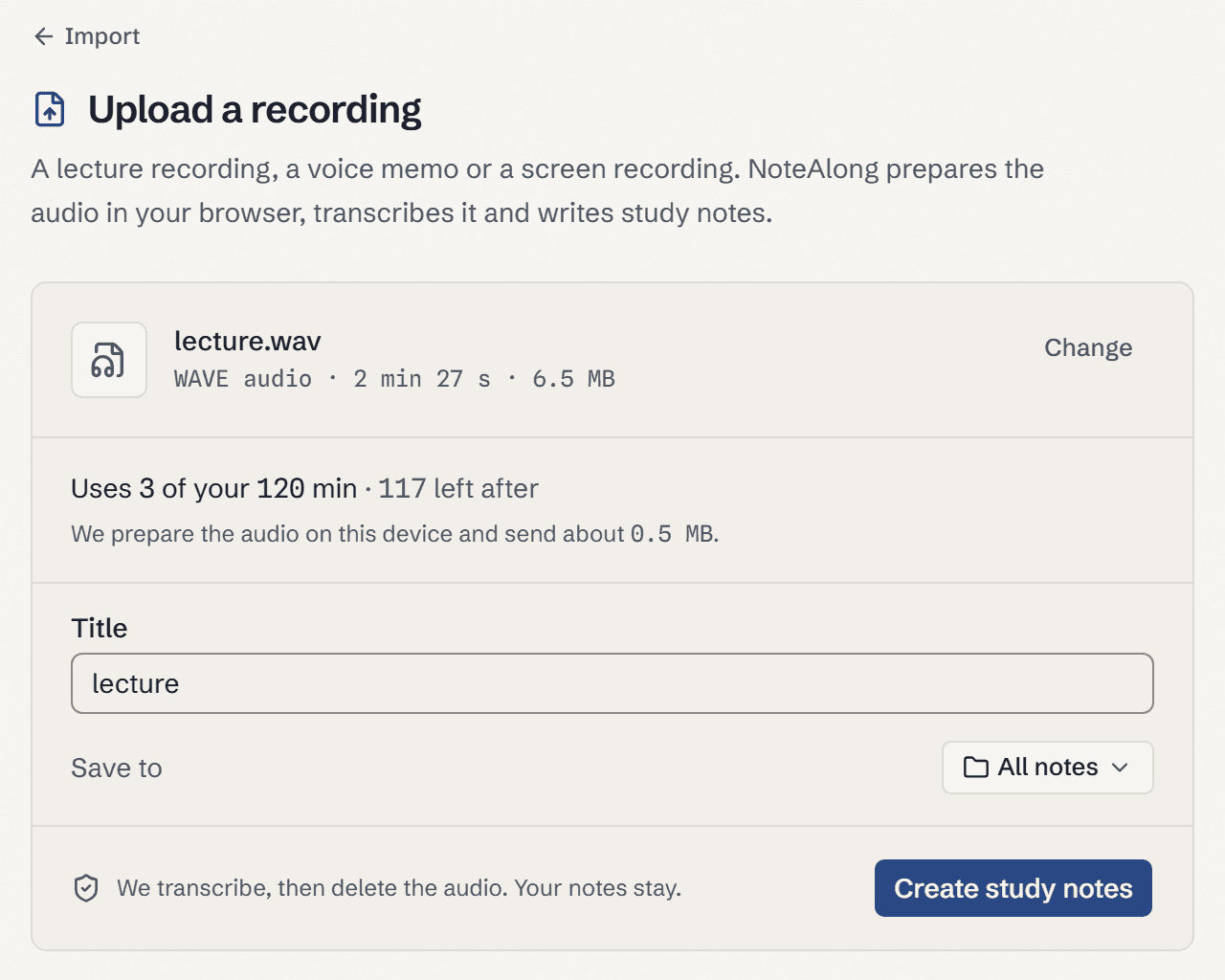
Before anything is sent, NoteAlong shows the length and how many of your minutes it will use. If the file is too long or you're short on minutes, nothing is sent and nothing is used.
03
Read the notes
The note arrives in sections that follow the lecture, with timestamps and the full transcript underneath. Edit it like any document.
At a glance
What each kind of recording gives you
| What you have | How it gets in | Slides in the notes? | Limit |
|---|---|---|---|
| Audio file (mp3, m4a, wav, aac, ogg, opus, flac) | Upload | No | 4 h per file, uses minutes |
| Video file (mp4, mov, webm, mkv and more) | Upload | No | 4 h per file, uses minutes |
| A lecture in the room | Record with your microphone | No | Uses minutes |
| A lecture playing in a browser tab | Share the tab | Yes, with slide capture and Snap | Uses minutes |
Each new note also counts toward your monthly notes. Free: 120 minutes and 5 notes a month. Plan limits as of October 2026.
What you get
What you get from an audio file
The file stays on your computer
NoteAlong doesn't upload your recording. Your browser reads it and sends small chunks of compressed audio, about 3.5 kB per second of sound. A 2-hour lecture goes up as roughly 25 MB, however big the original was. Each chunk is deleted once it's been turned into text.
Long files are fine
Up to 4 hours per file. A 3-hour review session goes in as one note, sectioned so the second hour doesn't blur into the third.
Course audio, recorded classes, study podcasts
A class recording your professor shared as a file on Canvas, a Zoom recording of office hours, a podcast episode your professor assigned. If you can save it as one of the formats, NoteAlong can read it.
Quotes you can check
Definitions and key lines are kept word for word, each with its timestamp. Ask your notes a question later and the answer names the note it came from.
Notes in your language
The speech engine understands about 100 languages. Notes can be written in 20 of them, and you can get a note in another language later: 3 a month on Free, unlimited on Pro.
Then study from it
Flashcards, quizzes and spaced review come straight from the note. Export to Anki or Obsidian is free on every plan.
Before you upload
An audio file gives you notes without slides. NoteAlong only picks up slides when you share a browser tab while the lecture plays, so if the video is online, play it in a tab instead. Uploads work in a recent Chrome, Edge or Firefox; a few files with Dolby (AC-3) audio can't be read in the browser. And if your recording is a work meeting or a sales call, use a meeting tool like Otter or Fireflies. NoteAlong writes study notes, not action items.
FAQ
Questions about uploading audio
Which audio formats can I upload?
MP3, M4A, WAV, AAC, OGG, Opus and FLAC. Video files work too: MP4, M4V, MOV, WebM, MKV, TS and MTS. NoteAlong only uses the sound track.
Is there a file size limit?
The limit is length, not size: 4 hours per file. Your browser converts the file before anything is sent, so a large WAV is fine. A 2-hour recording goes up as about 25 MB of compressed audio.
Does my original recording get uploaded?
No. The browser reads the file on your computer and sends only compressed audio for transcription. That audio is deleted once it's text. The original file never leaves your computer.
Can I upload a recording from my phone?
Yes, if it's in one of the supported formats; most phone recorder apps save m4a or mp3. iPhone Voice Memos work in the standard setting, not Lossless. Move the file to a computer and upload it there. NoteAlong doesn't have a mobile app.
How many minutes does a file use?
About its length. A 50-minute lecture uses about 50 minutes and makes one note. The free plan has 120 minutes and 5 notes a month; Pro has 3,000 minutes and 500 notes.
Does it label who is speaking?
No. NoteAlong doesn't tell speakers apart. That's fine for a lecture with one voice. For a group discussion where it matters who said what, a meeting transcription tool is the better pick.