Free on every plan · .apkg or CSV
Lecture in.
Anki deck out.
NoteAlong writes flashcards from your lecture notes and sends them to Anki. Export again later and the same cards update, with your reviews intact.
Updated
How do I turn lecture notes into Anki cards?
Make a note in NoteAlong from a lecture tab, a YouTube link, your mic or an audio file, and it writes flashcards from it. Choose Export to Anki, untick any card you don't want, then download an .apkg or send it straight to Anki on your computer. Export again later and changed cards update in place, keeping your review history. Anki export is free; the free plan covers 120 minutes and 5 notes a month.
How it works
From a lecture to a deck
01
Make the note
Share a lecture tab, paste a YouTube link, record with your mic or upload a file. Flashcards come from the finished note, in the Study tab or right inside the export dialog.
02
Look over the cards
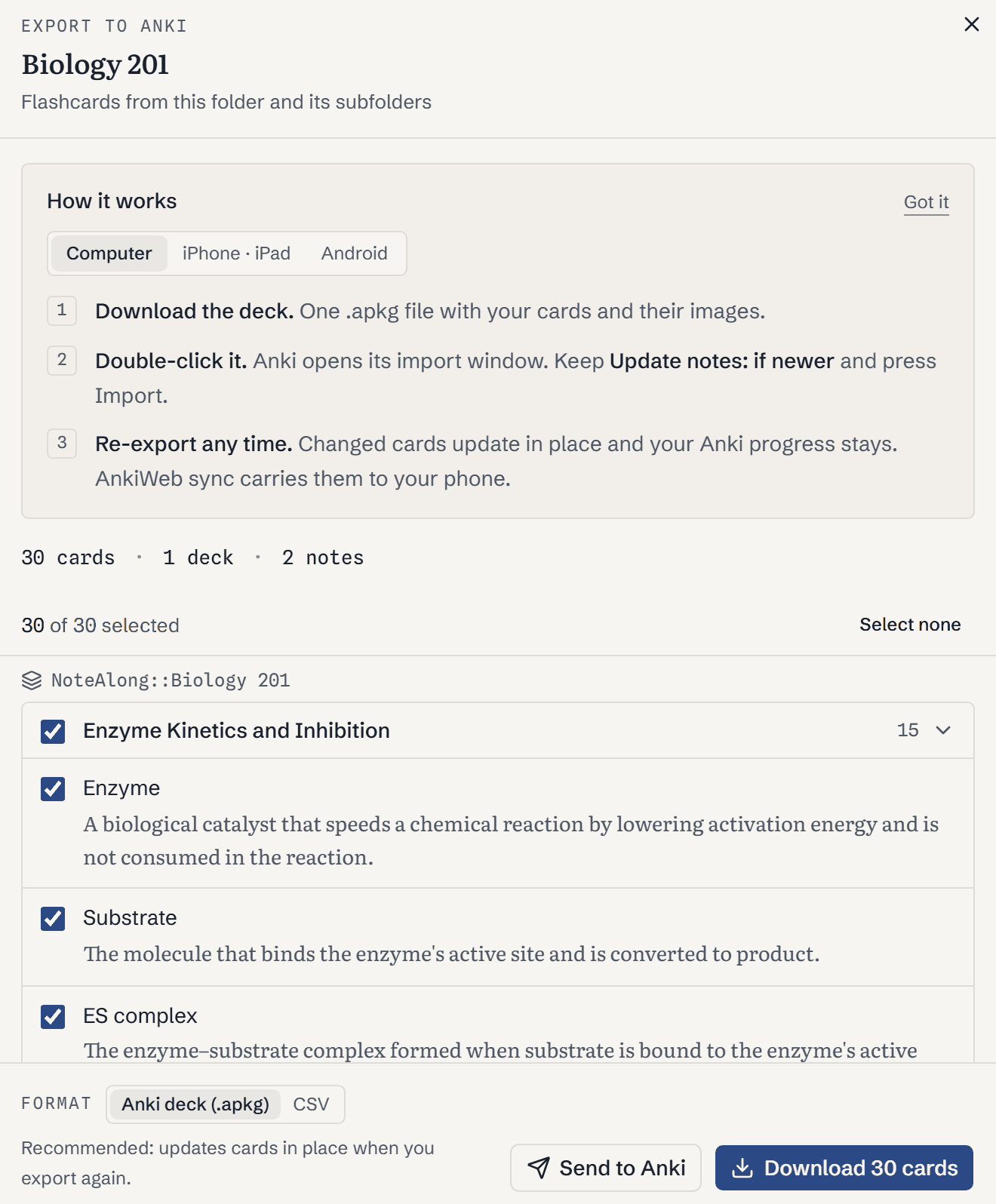
Cards are grouped by deck and note. Untick the ones you don't want. After your first export, each card is marked new or changed, so you only check what's different.
03
Download it, or send it
Double-click the .apkg and Anki imports it. With the free AnkiConnect add-on, Send to Anki puts the deck there directly on your computer.
What you get
Fixes for the usual AI-to-Anki problems
No duplicate deck when you export again
It's the complaint you see most about AI card tools: you fix a note, export again, and Anki fills up with copies. NoteAlong gives every card a fixed ID. Import the new .apkg and Anki updates the cards it already has. Your intervals and review history stay where they were.
Your edits in Anki survive
A card only counts as changed when NoteAlong's version of it changes. Fix a typo in Anki, and if that card hasn't changed in NoteAlong, the next export leaves your fix alone.
Cards you can check
The other complaint is bad cards: vague, wrong or padded. Each card carries a link back to its note in NoteAlong, where every point has a timestamp in the lecture. Anything you don't want, untick before you export.
Slides on the cards
When a slide in your note clearly matches a card's topic, the .apkg puts that slide image on the card. Notes only have slides when you watched the lecture in a shared tab.
Decks that follow your folders
A folder called Biology 101 with a subfolder Week 3 becomes the deck NoteAlong::Biology 101::Week 3. Export one note, one folder or everything.
CSV when the .apkg won't open
AnkiDroid on Android 16 can fail to import .apkg files. Pick CSV instead: it's text only. Stick to one format per deck, because Anki skips cards that arrive in the other one.
What it doesn't do
NoteAlong writes basic front-and-back cards. No cloze cards and no image occlusion. Send to Anki needs Anki open on a computer with AnkiConnect; on a phone, download the file instead. And if you already have finished slides or a PDF and just want cards from that, NoteAlong is the wrong tool, because it doesn't import documents. A card generator that reads PDFs will serve you better.
FAQ
Anki questions
Is the Anki export free?
Yes, on every plan, and Send to Anki is free too. The free plan's limit is on making notes: 120 minutes and 5 notes a month.
Will exporting again create a duplicate deck?
No. Each card has a fixed ID, so Anki updates the cards it already has and keeps their review history. Cards you deleted in NoteAlong arrive tagged NoteAlong::removed, so you can find and delete them in Anki.
Does it work with AnkiMobile and AnkiDroid?
Yes. On iPhone or iPad, open the .apkg in AnkiMobile, or import on a computer and let AnkiWeb sync it. On AnkiDroid, use the CSV if the .apkg import fails.
What does Send to Anki need?
Anki open on your computer with the free AnkiConnect add-on installed. Anki asks once whether NoteAlong may connect. It then imports the same .apkg the download button makes.
Can I make Anki cards from a YouTube video?
Yes. Paste the link, let NoteAlong write the note and its flashcards, then export. Our YouTube flashcards page covers that path in more detail.
Can I export a whole semester at once?
Yes. Export a folder or all your notes. Each folder becomes its own deck under NoteAlong, and one export holds up to 1,000 notes.
Make the notes once. Review them in Anki all semester.
Free plan · no card required. Anki® is a registered trademark of Ankitects. NoteAlong is not affiliated with or endorsed by Anki.