Free · NoteAlong community plugin
Lecture notes,
as files in your vault.
NoteAlong writes notes from YouTube videos and lectures, then puts them in Obsidian as plain Markdown, with slide images saved next to them. Sync with the official NoteAlong plugin or straight from your browser.
Updated
How do I get YouTube notes into Obsidian?
Paste the YouTube link into NoteAlong, or share the tab while the video plays. When the note is ready, sync it to your vault with the free NoteAlong community plugin, or pick your vault folder once in Chrome or Edge. Each note becomes a Markdown file with properties, timestamps and its images saved in your vault. Anything you write under My notes stays put on every sync. Free plan: 120 minutes and 5 notes a month.
How it works
Into your vault in three steps
01
Make the note
Paste a YouTube link, share a lecture tab, record with your mic or upload a file.
02
Connect your vault
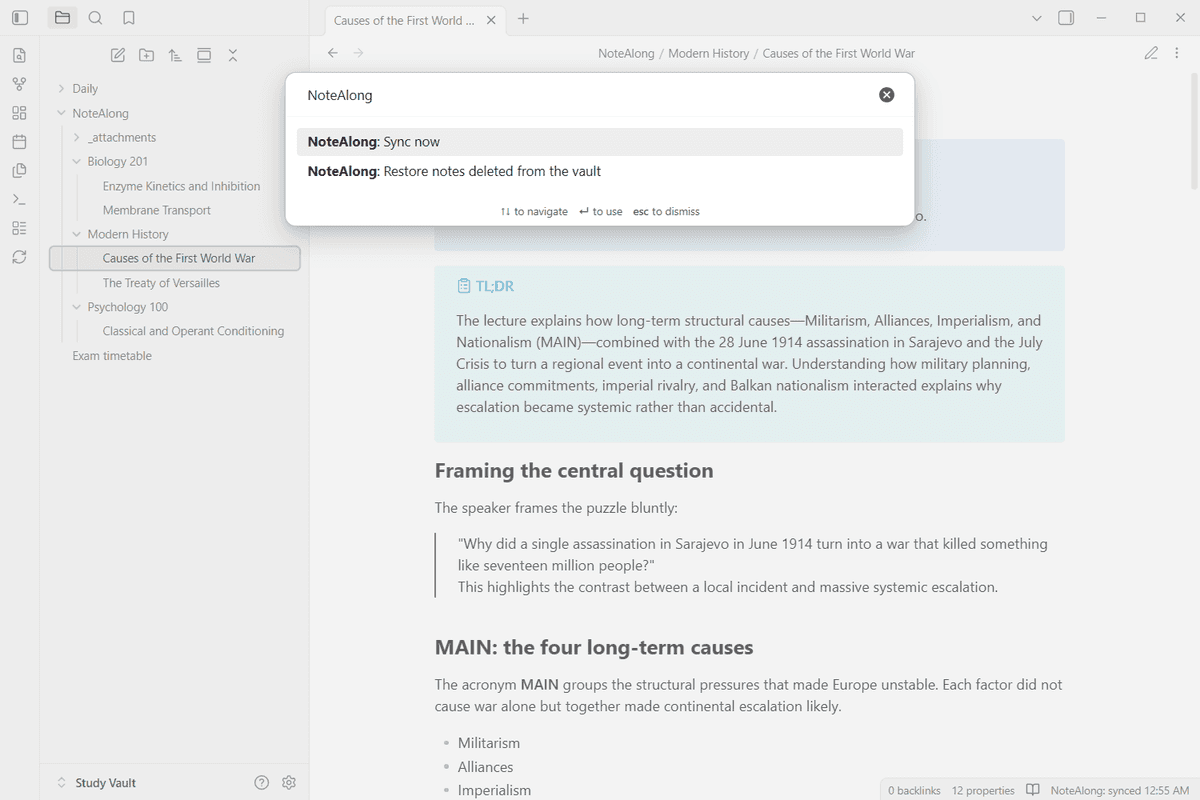
Install NoteAlong from Obsidian's community plugins and select Connect. No plugin wanted? In Chrome or Edge, pick your vault folder once in NoteAlong's settings.
03
Let it sync
Notes land under NoteAlong/ in the same folders you use in the app, and stay current as you edit them in NoteAlong.
At a glance
Four ways to get a note into Obsidian
| Way in | Where it works | Images | Keeps syncing? |
|---|---|---|---|
| NoteAlong community plugin | Obsidian on desktop, iOS and Android | Saved as files in your vault | Yes |
| Vault folder sync | Chrome or Edge on a computer | Saved as files in your vault | Yes, while NoteAlong is open |
| Download as .zip | Any browser | In the zip, as files | No, one-off |
| Copy as Markdown, or Open in Obsidian | Any browser | Placeholders (use the zip for images) | No, one note |
All four are free on every plan. As of October 2026.
What you get
What lands in your vault
Plain files you own
Every note is a .md file in your vault. No database, no special format. If you stop using NoteAlong tomorrow, the files stay where they are and open in any editor.
Slide images as real files
When you watched a lecture in a shared tab, the slides NoteAlong placed in the note are saved to NoteAlong/_attachments and linked with ordinary relative links. No remote URLs that break later.
Properties you can sort by
Each file carries the source, date, language and a link back to the note. Use them in Dataview or Bases like any other property.
Your edits are safe
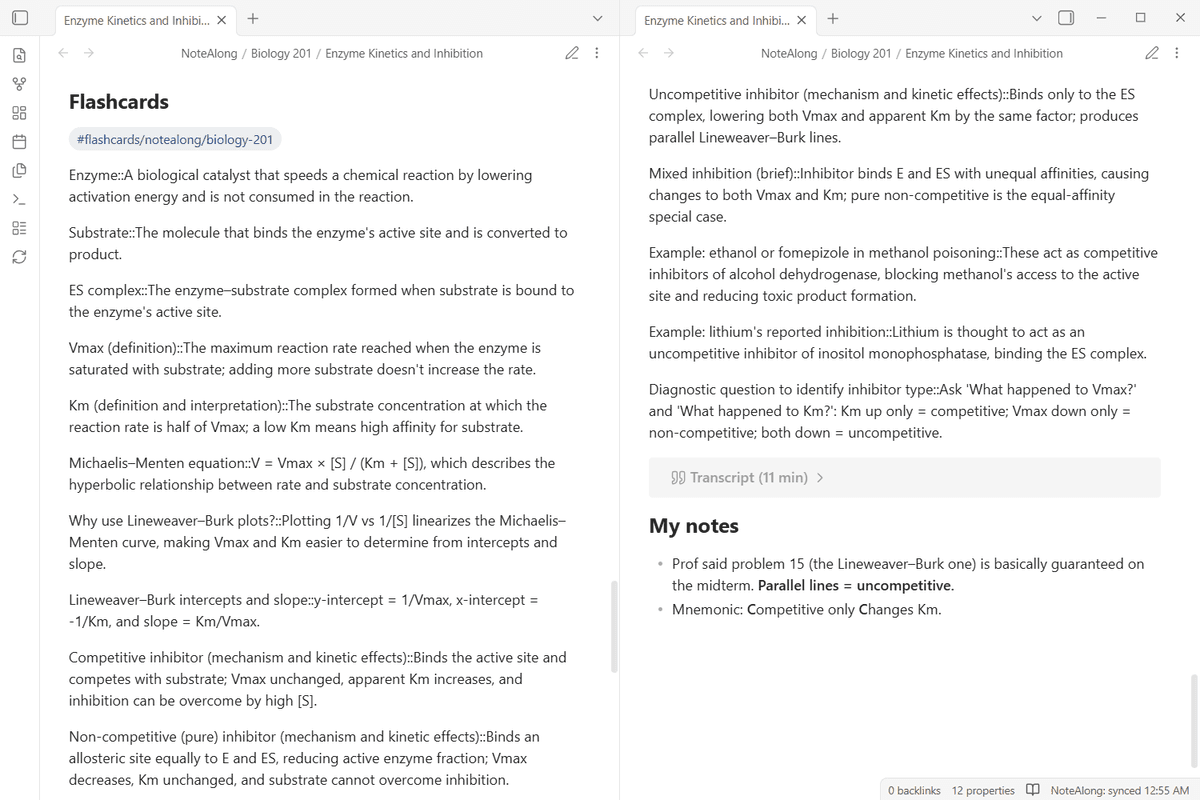
Write under the My notes heading at the end of a file and sync never touches it. Tags and properties you add stay. If you edit the part NoteAlong wrote and the note then changes, the update is saved as a separate file next to yours instead of overwriting it.
Flashcards for the Spaced Repetition plugin
Cards come in the format the Spaced Repetition plugin reads, and the review data it writes into your files is kept on every sync.
What the plugin asks for
A free NoteAlong account. It talks only to api.notealong.com with a read-only token kept in Obsidian's keychain. It never uploads anything from your vault and writes only inside its own folder.
Where it falls short
Vault folder sync from the browser needs Chrome or Edge on a computer; in Safari or Firefox, use the plugin or the .zip. The plugin only brings in notes you made in NoteAlong, so it won't summarize videos or recordings already sitting in your vault. If you want everything to stay offline with no outside account, NoteAlong is the wrong fit; running a transcription model like Whisper on your own machine suits you better.
FAQ
Obsidian questions
Is the NoteAlong Obsidian plugin free?
Yes. The plugin and syncing are free, with no ads. You need a NoteAlong account; the free plan makes 5 notes from up to 120 minutes a month.
Does it work on Obsidian mobile?
Yes. The plugin runs on desktop, iOS and Android. Each vault connects on its own, so run Connect in every vault you want your notes in.
Will syncing overwrite what I wrote?
No. Text under My notes is never touched. If you change the part NoteAlong wrote and the note then changes in NoteAlong, the update arrives as a separate file called "Title (NoteAlong update).md".
What if I delete a synced file in my vault?
It stays deleted. Sync won't bring it back unless you choose Restore notes deleted from the vault in the plugin.
Do I need the plugin at all?
No. In Chrome or Edge you can sync to your vault folder from NoteAlong's settings. In any browser you can copy a note as Markdown or download a .zip.
Watch the lecture. Find it in your vault.
Free plan · no card required. NoteAlong is an independent tool, not affiliated with or endorsed by Obsidian.